How MBC works
Last updated 17 November 2026
MBC is your bathroom cabinet on your phone. It keeps track of your make-up, skincare and toiletries, tells you before something runs out, and shows you the best price at Boots and Superdrug.
Adding products
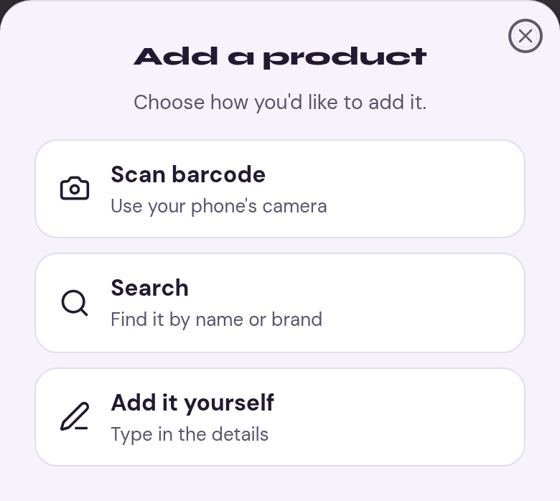
Tap Add on your cabinet, or the + on an empty shelf. You can:
- Scan barcode: point your camera at the barcode on the pack.
- Search: type the name or brand.
- Add it yourself: type the name, brand, type and size, and add a photo if you like.
Then answer a few quick questions: how often you use it, roughly when you bought it, and whether it's open. Skip any you're not sure about and MBC uses a sensible guess.
Your cabinet, colours and labels
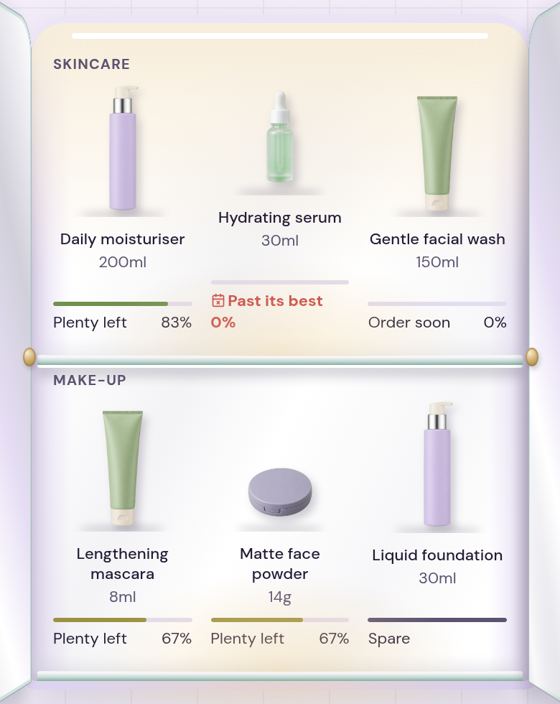
Each product sits on its shelf with a bar underneath showing roughly how much is left. The colour always comes with words:
- Plenty left (green): 40% or more left.
- Getting low (amber): between 15% and 40% left.
- Order soon (red): under 15% left, or close to running out.
- Past its best: past its use-within date once opened.
Tap a product to lift it off the shelf and see its details.
"I've replaced it"
When you finish a product and open a new one, tap it and choose I've replaced it. The bar goes back to full, and MBC learns how long that product really lasts for you, so its next guess is better.
Spares
Bought one to keep in reserve? Add it as unopened. It shows as a Spare with a full bar and doesn't count down. When you start it, tap I've opened it.
Best deal and which shops
When something is running low, tap Best deal to compare prices at Boots and Superdrug, cheapest first. Prices more than a day old show when they were last checked, and very old prices are hidden. Choose which shops to compare in Settings.
MBC may earn a small commission when you buy through our links. It never changes the price you pay or which deal we show as best.
Delivery
Some shops are mainly online. Where we know it, you'll see a line like "Delivery £3.99, free over £25" under the price, so you can judge the real cost.
Receipts
After you shop, add your receipt from the Receipts tab: take a photo, pick the shop and date, and match the items to your cabinet. MBC resets those products and learns from them. Insights shows what you spend by year, type and shop.
Reminders and the bell
MBC checks your cabinet every morning. If something is about to run out or reach its use-within date, you'll get one reminder that day, never a flood. Every reminder also appears under the bell at the top of your cabinet, even if you don't allow phone notifications.
In Settings you can turn run-out, expiry and deal reminders on or off, and set quiet hours when MBC won't buzz you. Phone notifications on iPhone need MBC added to your home screen first.
Design your cabinet
Tap the brush at the top of your cabinet to choose the finish, handles and lighting. Your design is saved to your account.
The Mirror
Close the doors and tap Mirror to use your front camera as a mirror. It only starts when you tap it and turns off when the doors open or after two minutes. Nothing is recorded or sent to us.
Installing to your home screen
MBC works best added to your home screen, like an app.
- iPhone: open MBC in Safari, tap the Share button, then Add to Home Screen.
- Android: open MBC in Chrome, tap Install when asked, or the menu then Install app.
Your data
Your cabinet, purchases and receipts are private to you. In Settings you can download everything we hold (as a JSON or CSV file) or delete your account for good. See our privacy policy.